NodeJS Test (Mocha, Chai)
TDD
TDD(Test Driven Development: 테스트 주도 개발)는 실제 코드 작성 전에, 단위 테스트 케이스를 만드는 것에 초점을 둔 개발 방법론입니다. 애자일 개발 방법론의 하나로, 단위 테스트 생성, 개발, 그리고 리팩토링의 주기를 반복합니다. 디음과 같은 3개의 주기로 나누기도 합니다.
- Red: 실패하는 테스트 작성
- Green: 테스트를 통과하게 하는 최소한의 코드 작성
- Refactor: 코드를 리팩토링하여 개선
- 아래 그림과 같이 표현될 수 있습니다.
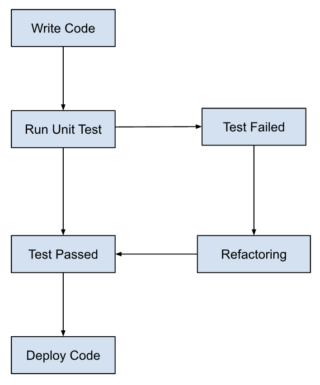
TDD는 전통적인 테스팅과 달리, 테스트를 코드 작성 전에 먼저 작성합니다. 이는 개발 프로세스에서 버그(에러)를 가능한 빨리 발견하게 하여 디버깅 및 수정을 용이하게 합니다.
추가로, 소프트웨어의 동작(Behavior)에 초점을 둔 BDD도 있습니다. 이는 사용자, 개발자, 비즈니스 이해 관계자가 정의한 시나리오를 기반으로 테스트 작성 및 개발 작업이 진행됩니다.
TDD가 반드시 도입해야 할 방법론은 아닙니다. 결국 추가적인 작업이며 자원 소모입니다. 장단점을 잘 확인해서 도입할 필요가 있습니다.
JS 테스트 자동화 도구 (테스트 라이브러리)
js에서 여러 클래스 간의 연관 관계가 복잡한 프로젝트를 수행할 때, 단위 테스트를 위한 라이브러리가 필요하다는 생각이 들어 조사했습니다.
- 브라우저 환경
- Karma
- NodeJS 환경
- Mocha, Jest, Puppeteer, Chai, Jasmine
- Puppeteer는 크롬 api로 브라우저 테스트도 진행 가능
제공하는 기능에 따라서 다음과 같이 나뉘기도 합니다.
- Testing Framework: Mocha, Jest, Jasmine
- Assertion Library: Chai, Assert(NodeJS 빌트인)
- Test Double Library: Sinon, TestDouble
기업에 소속된 상태가 아니라면, 어떤 프레임워크를 사용할지가 가장 고민일 것입니다. BrowserStack에서 이야기하는 각 프레임워크의 특징 및 장단점을 번역해 보았습니다:
| 특징 | Jest | Mocha | Jasmine |
|---|---|---|---|
| 주요 사용 환경 | React를 위해 처음 개발되어, NextJS와도 잘 작동합니다. | NodeJS로 설계된 애플리케이션에 더 적합합니다. | AngularJS와 잘 작동합니다. |
| 적합한 애플리케이션 | 강력한 UI 기반 애플리케이션에 적합합니다. | 복잡한 백엔드 애플리케이션에 적합합니다. | 가볍고 단순한 프로젝트에 적합합니다. |
| 내장 기능 | 내장된 assertion 라이브러리와 자동 모킹 기능이 있습니다. | 내장된 assertion 라이브러리는 없습니다. Chai 같은 외부 라이브러리를 주로 사용합니다. | 내장된 assertion 라이브러리가 있습니다. |
| 모킹 기능 | 자동 모킹 기능이 Jest 패키지에 포함되어 있습니다. | 모킹 기능은 내장되어 있지 않습니다. Simon을 사용하여 모킹할 수 있습니다. | 모킹 기능이 Jasmine 프레임워크에 포함되어 있습니다. |
| 테스트 러너 | Jest 패키지 내에 테스트 러너가 포함되어 있습니다. | 테스트 러너가 제공됩니다. | 기본적으로 테스트 러너가 제공되지 않습니다. Karma와 같은 추가 테스트 러너를 설치해야 합니다. |
| 비동기 테스트 | 비동기 테스트가 쉽고 좋은 결과를 얻을 수 있습니다. | 비동기 테스트 성능이 Jest만큼 뛰어나지 않습니다. | 비동기 테스트 성능이 Jest만큼 뛰어나지 않습니다. |
| 지원하는 개발 방법론 | 테스트 주도 개발(TDD)만 지원합니다. | 행위 주도 개발(BDD)과 테스트 주도 개발(TDD)을 모두 지원합니다. | 주로 행위 주도 개발(BDD)을 지원합니다. |
NodeJS에서 TDD 이루기
chai, mocha를 활용한 테스트
- it이 각 테스트를 의미하며, describe가 test suite(테스트 집합, 모음)에 구조를 부여합니다.
- sentactic sugar로서 co-mocha, chia-as-promised까지
최종 예시 코드
1
2
3
4
5
6
7
8
9
10
11
12
13
14
15
16
17
18
19
20
21
22
23
24
25
26
27
28
29
30
31
32
33
34
35
36
37
38
39
40
41
42
43
44
45
"use strict";

const User = require("./User");

const chai = require("chai");
const chaiAsPromised = require("chai-as-promised");

const db = require("./database");

chai.use(chaiAsPromised);
const expect = chai.expect;

describe("User module", () => {
  describe('"up"', () => {
    function cleanUp() {
      return db.schema.dropTableIfExists("users");
    }

    before(cleanUp);
    after(cleanUp);

    it("should export a function", () => {
      expect(User.up).to.be.a("Function");
    });

    it("should return a Promise", () => {
      const usersUpResult = User.up();
      expect(usersUpResult.then).to.be.a("Function");
      expect(usersUpResult.catch).to.be.a("Function");
    });

    it('should create a table named "users"', function* () {
      yield User.up();
      return expect(db.schema.hasTable("users")).to.eventually.be.true;
    });

    /** Before semantic sugar
     it('should create a table named "users"', () => {
      return User.up()
        .then(() => db.schema.hasTable('users'))
        .then((hasUsersTable) => expect(hasUsersTable).to.be.true)
    })
    */
  });
});
yield: co-mocha에서 프로미스를 멈추게 함. 실행 다 될 때까지 기다림. evantually: chai-as-promised에서 chai 컴포넌트를 프로미스에 대한 기댓값으로 확장해 줌.
1
2
3
4
5
6
7
8
9
10
11
12
13
14
15
16
17
18
19
20
21
22
23
24
25
26
27
28
29
30
31
32
33
34
35
36
37
38
39
40
41
42
43
describe("fetch", () => {
  it("should export a function", () => {
    it("should export a function", () => {
      expect(User.fetch).to.be.a("Function");
    });
    it("should return a Promise", () => {
      const usersFetchResult = User.fetch();
      expect(usersFetchResult.then).to.be.a("Function");
      expect(usersFetchResult.catch).to.be.a("Function");
    });

    describe("with inserted rows", () => {
      const testName = "Peter";

      before(() => User.up());
      beforeEach(() =>
        Promise.all([
          db
            .insert({
              name: testName
            })
            .into("users"),
          db
            .insert({
              name: "John"
            })
            .into("users")
        ])
      );

      it("should return the users by their name", () =>
        expect(
          User.fetch(testName).then(
            _.map(_.omit(["id", "created_at", "updated_at"]))
          )
        ).to.eventually.be.eql([
          {
            name: "Peter"
          }
        ]));
    });
  });
});
- 위의 테이블 생성 이후 fetch 함수 테스트 코드
- before로 테이블 생성, beforeEach로 테이블에 데이터 넣음.
- lodash를 활용하지 않은 코드는 아래와 같음.
1
2
3
4
it("should return users with timestamps and id", () =>
  expect(
    User.fetch(testName).then((users) => users[0])
  ).to.eventually.have.keys("created_at", "updated_at", "id", "name"));
internal function 테스트 (with
sinon모듈)- external function 호출에 대한 무시가 필요한데, sinon 모듈로 아래와 같이 가능합니다.
- stubbing: 함수의 구현을 제공하여 호출되지 않습니다.
- spying: 원본 구현과 함께 호출되지만 assertion을 만들 수 있습니다.
- mocking: stubbing과 같으나 객체까지
1
2
3
4
5
6
7
8
9
it("should call winston if name is all lowercase", function* () {
  sinon.spy(logger, "info");
  yield User.fetch(testName.toLocaleLowerCase());

  expect(logger.info).to.have.been.calledWith(
    "lowercase parameter supplied"
  );
  logger.info.restore();
});
1
2
3
4
5
6
7
function fetch(name) {
  if (name === name.toLocaleLowerCase()) {
    logger.info("lowercase parameter supplied");
  }

  return db.select("*").from("users").where({ name });
}
결과
1
2
3
4
5
6
7
with inserted rows
info: lowercase parameter supplied
    ✓ should return users with timestamps and id
info: lowercase parameter supplied
    ✓ should return the users by their name
info: lowercase parameter supplied
    ✓ should call winston if name is all lowercase
이때, logger 호출은 테스트에서 확인할 수 있지만, 실제 output이 매 테스트마다 함께 여러번 출력되고 있습니다. 테스트 결과가 이와 같이 어수선한 것은 지양해야 하기에 아래와 같이 stub을 활용해 수정할 수 있습니다. 앞서 말했지만 stub는 함수를 실제로 호출하지 않습니다.
1
2
3
4
5
6
7
8
9
it("should call winston if name is all lowercase", function* () {
  sinon.stub(logger, "info");
  yield User.fetch(testName.toLocaleLowerCase());

  expect(logger.info).to.have.been.calledWith(
    "lowercase parameter supplied"
  );
  logger.info.restore();
});
이러한 패러다임은 여러분의 함수가 DB를 실제로 호출하지 않길 원할 때도 사용할 수 있습니다. 이때, DB 객체에 대한 함수들을 전부 stub처리하기보다 sinon의 sandbox를 사용하여 테스트의 샌드박스를 정의할 수 있습니다.
1
2
3
4
5
6
7
8
9
10
11
12
13
14
15
16
17
18
19
20
21
22
23
it("should build the query properly", function* () {
  const sandbox = sinon.sandbox.create();

  const fakeDb = {
    from: sandbox.spy(function () {
      return this;
    }),
    where: sandbox.spy(function () {
      return Promise.resolve();
    })
  };

  sandbox.stub(db, "select", () => fakeDb);
  sandbox.stub(logger, "info");

  yield User.fetch(testName.toLocaleLowerCase());

  expect(db.select).to.have.been.calledOnce;
  expect(fakeDb.from).to.have.been.calledOnce;
  expect(fakeDb.where).to.have.been.calledOnce;

  sandbox.restore();
});
beforeEach에서 sandbox.create()로 생성하고 afterEach에서 sandbox.restore()로 복원할 수 있습니다.
1
2
3
4
5
6
beforeEach(function () {
  this.sandbox = sinon.sandbox.create();
});
afterEach(function () {
  this.sandbox.restore();
});
마지막 리펙토링으로, 가짜 객체에 대한 속성을 계속 stubbing하는 대신 mock을 사용하고, 함수 체이닝 대신 returnThis를 사용할 수 있습니다.
1
2
3
4
5
6
7
8
9
10
it("should build the query properly", function* () {
  const mock = sinon.mock(db);
  mock.expects("select").once().returnsThis();
  mock.expects("from").once().returnsThis();
  mock.expects("where").once().returns(Promise.resolve());

  yield User.fetch(testName.toLocaleLowerCase());

  mock.verify();
});
실패 테스트
- db 등은 가끔 오류를 일으킬 수 있으며 이에 대한 테스트도 준비해야 합니다. stub으로 에러를 throw해줄 수 있습니다.
1
2
3
4
5
6
7
8
9
10
11
12
13
14
15
16
17
18
19
20
21
22
it("should log and rethrow database errors", function* () {
  this.sandbox.stub(logger, "error");
  const mock = sinon.mock(db);
  mock.expects("select").once().returnsThis();
  mock.expects("from").once().returnsThis();
  mock
    .expects("where")
    .once()
    .returns(Promise.reject(new Error("database has failed")));

  let err;
  try {
    yield User.fetch(testName.toLocaleLowerCase());
  } catch (ex) {
    err = ex;
  }
  mock.verify();

  expect(logger.error).to.have.been.calledOnce;
  expect(logger.error).to.have.been.calledWith("database has failed");
  expect(err.message).to.be.eql("database has failed");
});
try-catch문을 지양하는 더 함수적인 접근법은 아래와 같습니다.
1
2
3
4
5
6
7
8
9
10
11
12
13
14
it("should log and rethrow database errors", function* () {
  this.sandbox.stub(logger, "error");
  const mock = sinon.mock(db);
  mock.expects("select").once().returnsThis();
  mock.expects("from").once().returnsThis();
  mock
    .expects("where")
    .once()
    .returns(Promise.reject(new Error("database has failed")));

  return expect(
    User.fetch(testName.toLocaleLowerCase())
  ).to.be.rejectedWith("database has failed");
});
- Getting Node.js Testing and TDD Right